Grid linesGrid lines
Evoqins - Blog

Mobile app development7 mins read

Grocery Delivery Apps: Benefits, Features, And Development Process

Posted on

blog cover image
Table of contents
IntroductionWhat is a grocery delivery app, and how does it work?Business models for grocery delivery applicationsBenefits of building a grocery delivery app for businessesChallenges of building a grocery delivery app and how to solve themKey features & functionalities of a grocery delivery appGrocery delivery app development: 6 key stepsWhy choose us to develop a grocery delivery app for your business?ConclusionFrequently asked questions
Share this article:

Introduction

Grocery shopping has moved from carts to clicks. With modern lifestyles demanding more convenience, the rise of grocery delivery apps has transformed how people shop for essentials. Whether you're a retailer or an entrepreneur, ignoring this digital wave could leave you behind. Imagine ordering your weekly or monthly groceries while sipping coffee at home and having them delivered to your doorstep within hours.

This convenience is no longer a luxury but a standard expectation. The elevated demand for grocery delivery apps has transformed shopping habits, offering unparalleled ease and efficiency. For businesses, this shift presents a golden opportunity to enter into a growing market and enhance customer satisfaction. In this blog, we’ll break down everything you need to know to build, launch, and scale your grocery delivery app in 2026.

What is a grocery delivery app, and how does it work?

A grocery delivery app is a mobile or web application that allows you to shop for groceries right from your phone or computer and have them delivered to your home. It works just like an online supermarket. Instead of going to a physical grocery store, you browse items like fruits, vegetables, bread, milk, snacks, or household products through the app. These apps are built to make your life easier by saving you time, energy, and sometimes even money, especially if you're busy or unable to shop in person.

How does a grocery delivery app work?

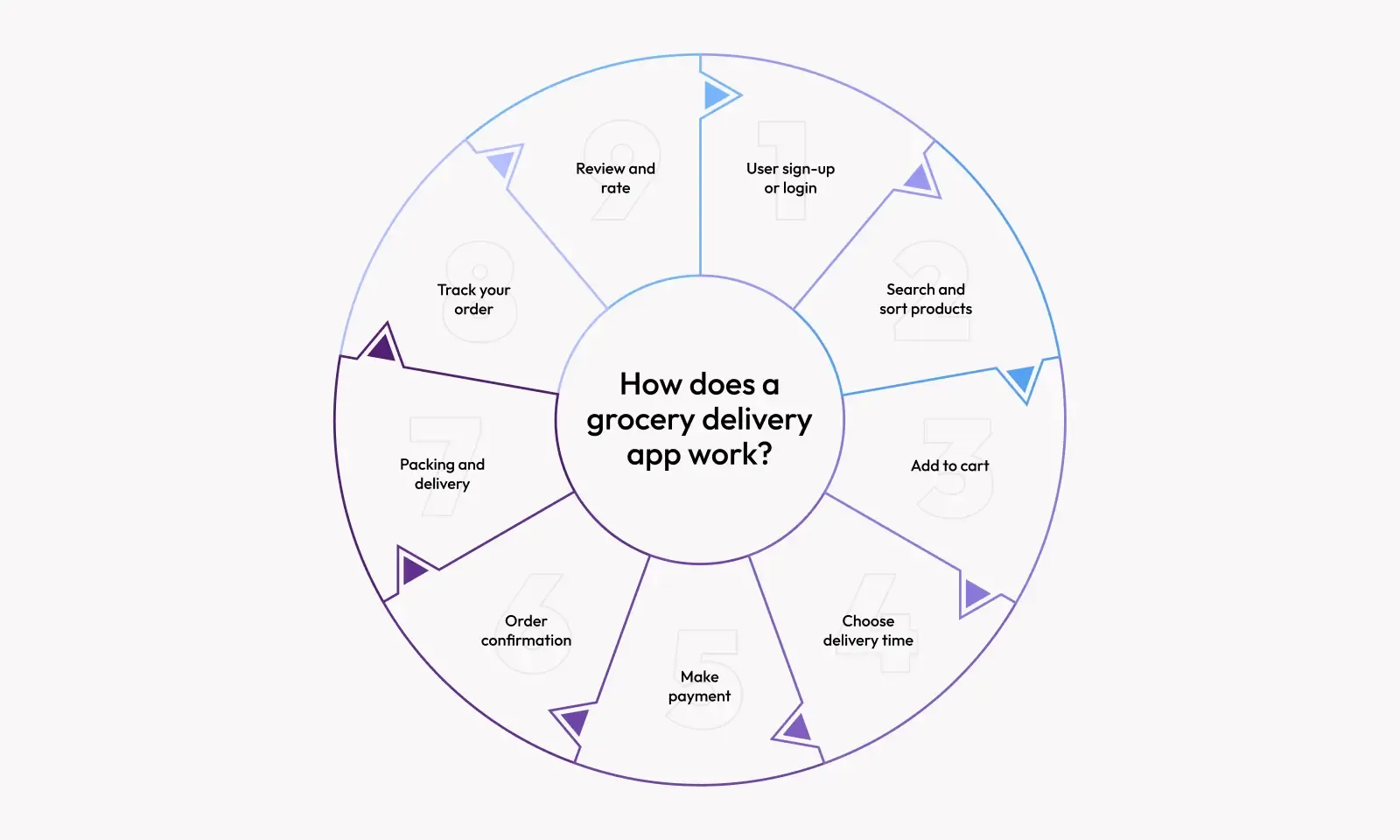
Here’s a simple step-by-step explanation of how it usually works:

How does a grocery delivery app work

  1. User sign-up or login
  2. Search and sort products
  3. Add to cart
  4. Choose delivery time
  5. Make payment
  6. Order confirmation
  7. Packing and delivery
  8. Track your order
  9. Review and rate

For better understanding, here is a simple analogy. Think of it like ordering pizza, but instead of just pizza, you can order everything you’d buy at a supermarket, and someone delivers it to your home. The key stakeholders involved in this process are:

  • Customers: Place and receive orders.
  • Grocery Stores: Provide products for the app.
  • Delivery Personnel: Pick up and deliver groceries to your doorstep.
  • Admin: Manages the app, updates product listings, and handles issues.

Business models for grocery delivery applications

Every grocery delivery app needs a plan for how it works behind the scenes. That’s where business models come in. They define who supplies the groceries, how orders are fulfilled, and how revenue is generated. Here are the four main models most commonly used:

Inventory model: The business owns a warehouse or store with all the groceries. When you place an order, the business picks, packs, and delivers everything directly to you. For example, Walmart grocery or BigBasket. Your next doubt must be how it works. So here is the answer

  • A business buys and stores all products.
  • Manages its own delivery fleet or third-party logistics.
  • Full control over stock and pricing.
ProsCons
Quality control is easier.High startup costs (inventory, staff, warehouse).
Faster deliveries from owned inventory.Harder to scale quickly to new locations.

Aggregator model: The app connects users to local grocery stores but doesn’t own any inventory. It simply acts as a middleman. For example, Instacart, Swiggy Instamart, etc. It works like this:

  • App lists groceries from multiple nearby stores.
  • Users choose their preferred store and order.
  • The app sends the order to the store.
  • The delivery partner handles the pick-up and drop-off of the items.
ProsCons
Low operational cost (no stock or storage needed).Less control over product quality and delivery times.
Easy to partner with multiple stores.Margins can be smaller.

Marketplace model: This is like an online farmers’ market. Independent vendors or small retailers list their groceries, and the platform connects them with customers. For example, Amazon Fresh (partly uses this), which is like this:

  • Sellers sign up and list products.
  • Customers browse and order from different sellers.
  • The platform or seller handles delivery.
ProsCons
Huge product variety.Difficulty managing consistency in service and product quality.
Scales well without needing physical stores.Requires strong seller verification and support systems.

Hybrid model: A mix of the inventory and aggregator models. Businesses may manage their own inventory and partner with local stores to expand their catalog. For example, BigBasket (Warehouse + local store partners) and the working model of the hybrid model is:

  • Core products come from the business’s warehouse.
  • Additional items are sourced from partner stores.
  • Delivery managed in-house or outsourced.
ProsCons
Balance between control and scalability.Requires coordination with multiple vendors.
Broader range of products for users.More complex operations.

Regardless of the model, grocery delivery apps usually earn through:

  • Delivery fees (charged to customers)
  • Commission from partner stores
  • Featured listings or advertisements
  • Subscription plans (for free delivery or special discounts)

Benefits of building a grocery delivery app for businesses

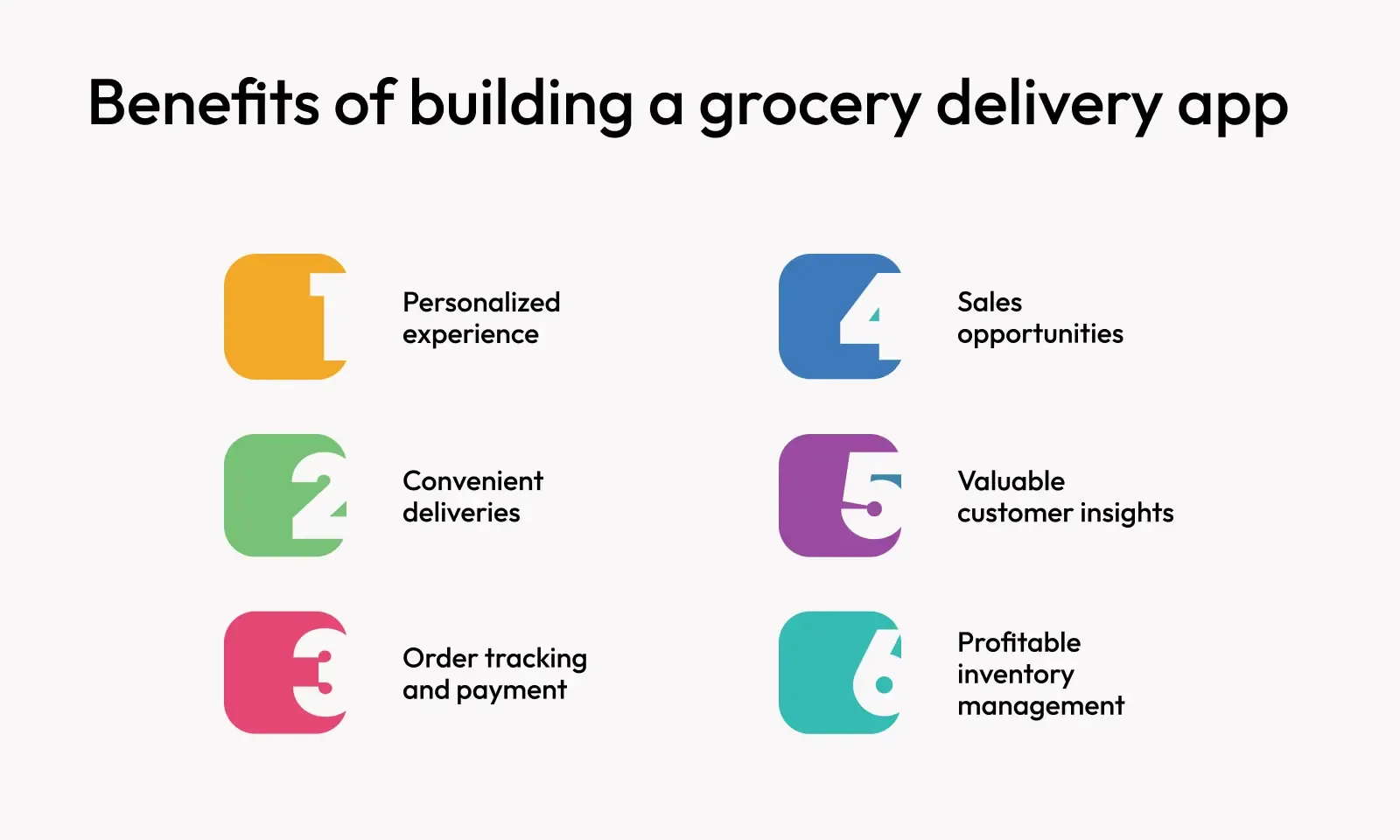
- Personalized experience: Offer tailored product recommendations, exclusive discounts, and smart reordering options based on user behaviour. It keeps customers engaged and coming back for more information on your application.
- Convenient deliveries: Make grocery shopping hassle-free with flexible delivery slots, real-time updates, and doorstep drop-offs. Customers value the ease, and your brand earns trust.

benefits of grocery delivery app

- Order tracking and payment: From placing an order to final delivery, customers enjoy a smooth, transparent experience. Integrated payment gateways and real-time tracking add speed and security to every transaction.
- Sales opportunities: With a digital storefront available 24/7, you can reach more customers, upsell popular items, and run targeted promotions — all of which drive higher revenue.
- Valuable customer insights: Track buying patterns, preferences, and feedback to refine your offerings. The data you collect becomes a roadmap to better service and smarter business decisions.
- Profitable inventory management: Sync your inventory with the app to reduce wastage, avoid stockouts, and automate reordering. Efficient stock control leads to lower costs and higher profitability.

Challenges of building a grocery delivery app and how to solve them

  1. Complex Inventory & Product Catalog Management Challenge: Grocery items have high SKU counts, are perishable goods, and have frequent price or stock changes. Solution:
  • Use real-time inventory syncing with backend systems.
  • Implement barcode/QR-based inventory tracking.
  • Integrate with supplier APIs to auto-update stock and pricing.

challenges of a grocery delivery app

  1. Last-Mile Delivery & Logistics Challenge: Timely and cost-efficient delivery, especially for perishable goods and during peak hours. Solution:
  • Optimize delivery routes using geolocation and AI.
  • Partner with local logistics/delivery services for hyperlocal execution.
  • Offer flexible delivery slots and real-time tracking to customers.
  1. High Customer Expectations Challenge: Customers expect ultra-fast delivery, order accuracy, and a smooth user experience. Solution:
  • Build a simple, intuitive UI with smart search, filters, and repeat ordering.
  • Use automated order validation and smart suggestions to minimize cart errors.
  • Leverage feedback loops to refine the UX continuously.
  1. Managing Returns & Refunds Challenge: Handling returns (especially fresh products) can be messy and costly. Solution:
  • Create clear refund/return policies within the app.
  • Enable partial refunds and digital wallets for seamless handling.
  • Use customer feedback to reduce repeat complaints on specific products.
  1. High Competition & Customer Retention Challenge: Competing with giants like Blinkit, Zepto, Instacart, etc. Solution:
  • Focus on niche or underserved areas (like regional groceries or Tier 2/3 cities).
  • Offer subscription plans, loyalty rewards, or hyperlocal products.
  • Build a strong brand with exceptional customer support and consistent service.
  1. Real-Time Order Tracking & Notifications Challenge: Customers want to know exactly where their order is and when it will arrive. Solution:
  • Integrate live tracking using GPS for delivery personnel.
  • Send real-time notifications via SMS, email, or in-app.
  • Provide estimated time of arrival with dynamic updates.
  1. Scalability & Performance Challenge: Managing peak-time traffic without app crashes or slowdowns. Solution:
  • Build on scalable cloud infrastructure (e.g., AWS, Azure).
  • Use caching and a microservices architecture for better performance.
  • Continuously monitor app metrics to identify and resolve bottlenecks.

Key features & functionalities of a grocery delivery app

To build a successful grocery delivery app, it's essential to offer features that streamline shopping, delivery, and backend management. Here’s a quick overview:

⇒ Customer app features The main app your customers will use to browse groceries, place orders, and track deliveries. Here's what it should include:

  • User Login & Onboarding: Customers should be able to sign up or log in quickly using their mobile number (via OTP), email, or even social media accounts like Google or Facebook.
  • Smart Search & Filters: A powerful search bar and category-based filters help users find what they need without hassle, whether it's “organic apples” or “low-fat milk.”
  • Real-Time Inventory: Only show products that are available in stock, along with current prices. It helps avoid customer frustration when items go out of stock.
  • Cart, Wishlist & Reordering: Users should be able to add items to a cart for checkout, save favourites for later, and even reorder past purchases in just one click.
  • Multiple Payment Options: Include UPI, credit/debit cards, digital wallets (like Paytm or Google Pay), and Cash on Delivery (COD) to suit different customer preferences.
  • Delivery Scheduling & Live Tracking: Let users choose when they want their groceries delivered and track their delivery person in real time with ETA updates.
  • Push Notifications: Keep customers informed about order confirmations, dispatch updates, exclusive deals, and seasonal offers.
  • Ratings & Reviews: After delivery, customers can share feedback on products and service quality, helping build trust with future users.

⇒ Delivery partner features This version of the app is designed for the people delivering the groceries. It helps them manage their daily deliveries efficiently.

  • Order Dashboard: Shows all the pickup and drop details in a neat, clear format. Each delivery partner knows exactly where to go and when.
  • GPS-Based Navigation: Built-in map support for optimized delivery routes—saving time and fuel, while ensuring quicker deliveries.
  • Order Status Updates: Delivery staff can mark orders as “Picked Up,” “On the Way,” or “Delivered,” keeping customers and the admin in the loop.
  • Proof of Delivery: Secure the final step by capturing an OTP code, a digital signature, or even a photo to confirm successful delivery.
  • In-App Chat or Call: If the delivery person needs to contact the customer (maybe for directions or gate instructions), they can do it right from the app.

⇒ Admin panel features It is the heart of the entire operation—used by business owners or staff to monitor, manage, and improve the delivery system.

  • Product & Inventory Management: Add, remove, or update items with images, pricing, and stock status. It ensures the app is always up to date.
  • Customer & Delivery Agent Tracking: View order history, monitor active deliveries, and track customer activity to optimize support.
  • Promotions & Coupons: Easily set up promotional campaigns, special offers, and referral bonuses to attract new customers and retain old customers.
  • Analytics Dashboard: Real-time data on total sales, active users, average delivery times, popular items, and more. These insights help drive better business decisions.
  • Push Notification Management: Control which messages go out to users and when—for example, sending a flash sale alert or delivery status reminder.
  • Role-Based Access: You can assign different roles and permissions to your team (e.g., manager, inventory staff, support), ensuring secure and efficient operations.

⇒ Advanced add-ons (optional but recommended) To make your app stand out from the competition, consider these advanced features:

  • Voice Search & Chatbots: Let users speak their queries instead of typing or interact with a smart assistant for faster ordering.
  • Loyalty Programs & Subscriptions: Reward repeat customers with points, discounts, or subscription boxes for weekly or monthly grocery delivery.
  • Dark Mode & Accessibility Settings: These features make your app more inclusive and user-friendly, especially for those with visual sensitivities or disabilities.

Grocery delivery app development: 6 key steps

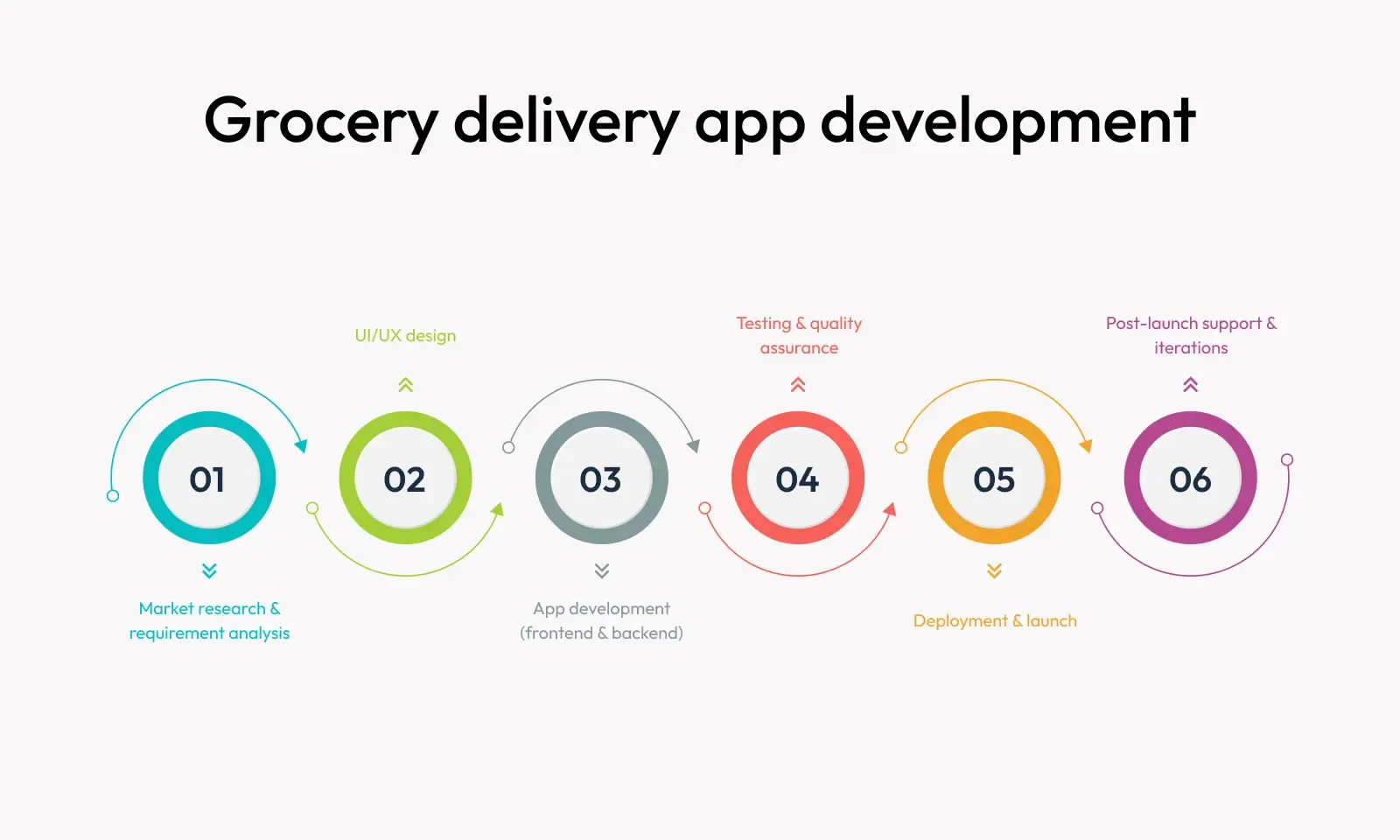
Building a grocery delivery app is more than just coding — it’s about delivering a smooth, scalable, and customer-friendly experience. Here’s a streamlined view of the complete development process, from research to post-launch support:

how to develop a grocery delivery app

- Market research & requirement analysis: This phase sets the foundation. It involves studying user behaviour, competitor apps, market trends, and business goals. The goal is to identify the app’s core features, define the target audience, and outline unique selling points. A detailed requirement document is created, covering user flows, app functionalities, and platform preferences (iOS, Android, or both).
- UI/UX design: Once the features are defined, the focus shifts to designing intuitive user experiences. Wireframes, mockups, and clickable prototypes are created to visualize the app’s layout and navigation. The design prioritizes ease of use, clean product presentation, and frictionless checkout to ensure a delightful shopping journey across devices.
- App development (frontend & backend): It is where the design comes to life. The frontend development covers customer, delivery, and admin interfaces, while the backend handles databases, APIs, authentication, and real-time features like tracking and order updates. Developers also integrate third-party services like payment gateways, SMS, and geolocation tools.
- Testing & quality assurance: Before launch, the app undergoes rigorous testing to catch bugs, performance lags, and usability issues. Functional testing, UI testing, API testing, and stress testing ensure the app runs smoothly under all conditions. Special attention is given to checkout flows, cart management, and live tracking.
- Deployment & launch: After testing, the app is deployed to the app stores (Google Play and App Store) along with the web dashboard, if any. Proper version control, deployment scripts, and store optimization (ASO) help ensure a smooth launch. Soft launches or beta releases can help gather early feedback before a wider rollout.
- Post-launch support & iterations: The development doesn’t end at launch. Ongoing support is essential to fix bugs, release updates, optimize performance, and add new features based on user feedback. Analytics tools are used to monitor user behaviour and continuously refine the app experience for better engagement and retention.

Why choose us to develop a grocery delivery app for your business?

Developing a grocery delivery app isn't just about coding; it's about building a seamless ecosystem that delivers convenience, reliability, and growth. Here’s why businesses trust us for their grocery app development:
- Domain expertise: We’ve built high-performance apps for retail and hyperlocal delivery businesses. Our deep understanding of inventory management, logistics, and user experience translates into smarter solutions for your app.
- End-to-end development: From strategy and design to development, testing, and post-launch support, we handle everything in-house, ensuring quality, consistency, and accountability at every step.
- Scalable, future-ready architecture: We build on modern, cloud-native tech stacks that are ready to scale as your business grows. Whether you’re serving one city or launching nationwide, your platform will stay fast and reliable.
- UX-first approach: We design apps your customers will love using with intuitive navigation, real-time tracking, personalized shopping, and smooth checkout experiences across all devices.
- Fast turnaround, without cutting corners: Our agile process ensures your product gets to market quickly, without sacrificing performance, design, or security.
- Ongoing support & growth partnership: We don’t disappear after launch. We stay involved to help you iterate, improve, and grow, with regular updates, analytics-driven insights, and new feature rollouts.

Conclusion

Creating a grocery delivery app isn't just about keeping up with trends—it's about meeting your customers where they are. People today expect to get everything they need with just a few taps on their phones, and groceries are no exception. If you're a business owner, this is your chance to be part of a growing market and offer real value to your customers.

But don’t worry if the whole app-building process sounds technical or overwhelming. With the right team by your side, you’ll be guided step-by-step from planning to launching and even beyond. You’ll end up with a smooth, easy-to-use app that helps your customers shop better and helps your business grow faster.

So, whether you're just starting out or looking to upgrade your existing setup, developing a grocery delivery app is one smart move. The future of grocery shopping is online, and your business deserves a piece of that future.

Frequently asked questions

1. How much does it cost my pocket to build a grocery delivery app? The cost depends on many things, like how many features you want, how complex the design is, whether it's for one platform (like Android or iPhone) or both, and the team you hire. A basic version costs less, while adding more advanced features like real-time tracking, multiple payment options, or partner portals increases the cost.

2. How long will it take to develop my app? Just like cost, the time to build your app depends on its complexity. A simple grocery delivery app with basic features can be made faster, while a more detailed one with special options (like scheduled deliveries, subscription plans, or multiple user roles) will take longer. In general, the process includes planning, design, development, testing, and final launch, and each step needs careful attention.

3. Can I start small and then add more features later? Absolutely! In fact, that’s often a smart way to do it. You can start the development of the idea with a minimum viable product, which is a basic version of the app with the most essential features. Once it's live and you start getting feedback from users, you can keep improving it by adding new features over time.

4. Will the app be safe for online payments and user data? Yes, your app can be made very secure. Developers use advanced security practices like encrypted payment systems, secure login processes, and regular updates to keep everything safe. It’s just like any trusted online shopping platform you use—your customers’ data and money will be protected.

5. Can I connect my app with local stores or third-party services? Yes, you can! Your app can be built to connect with local grocery stores, payment gateways, delivery services, and even loyalty programs. These third-party integrations help make the app more powerful and flexible, giving your customers more choices and a better experience.

6. Do I need both a mobile app and a website? While most people today use mobile phones to shop, having a website can still be helpful, especially for older customers or for managing bulk orders. Some businesses start with just a mobile app and add a website later. Others build both at once. It all depends on your audience and budget.

Evoqins - Blog

Subscribe and keep updated

Get weekly update about our product on your email, no spam guaranteed we promise ✌️