Grid linesGrid lines
Evoqins - Blog

Mobile app development7 mins read

Food Delivery App Development: A Comprehensive Guide in 2026

Published on: Jun 1, 2026

blog cover image
Table of contents
IntroductionOverview of food delivery appsWhy developing an app like zomato is a lucrative business idea?Market analysis and growth of the food delivery industryWhy should you opt for on-demand food delivery app development?Features of an on-demand food delivery applicationSteps to develop a food delivery app for your business ideaWhat innovative solutions are food delivery apps implementing?ConclusionFrequently asked questions
Share this article:

Introduction

In a world where convenience defines consumer behaviour, food delivery apps have carved out an indispensable place in our daily lives. Gone are the days when dining out or cooking was the only option. Today, with just a few taps, one can order their favourite meals from a range of restaurants and get them delivered right to their doorstep. This shift in lifestyle has made food delivery apps, such as Zomato, Swiggy, and Uber Eats, immensely popular.

With the rising demand for on-demand services, launching a food delivery app has emerged as a highly lucrative business opportunity. Entrepreneurs and businesses looking to invest in this sector can ride the wave of digital transformation and tap into a market that’s only going to grow bigger. But building an app like Zomato isn’t just about coding; it’s about understanding the industry, aligning with user needs, and staying ahead of the tech curve.

Overview of food delivery apps

Food delivery apps have revolutionized the way people access their favourite cuisines. Acting as digital bridges between customers and restaurants, these apps enable users to browse menus, place orders, make payments, and get food delivered, all from the comfort of their homes. The ecosystem typically consists of three core stakeholders: customers, restaurants, and delivery personnel. Leading platforms like Zomato, Swiggy, Uber Eats, and DoorDash have refined this model to offer fast, convenient, and personalized services.

What is a food delivery application?

Modern food delivery apps go beyond basic ordering; they integrate GPS tracking, customer reviews, AI-powered recommendations, and loyalty programs to enhance the overall experience. With features designed for both urban convenience and rural accessibility, they have become indispensable in today's lifestyle, especially in fast-paced cities and among digitally native populations.

Importance of food delivery services in the modern era: The modern consumer places high value on convenience, speed, and choice, all of which food delivery apps deliver effortlessly. Whether it’s a busy professional skipping lunch prep, a family ordering dinner during a weekend movie night, or someone seeking comfort food during a late-night craving, food delivery platforms serve every scenario. As dine-in options became limited, food delivery became a lifeline for both consumers and restaurants. Today, even post-pandemic, the shift in behaviour has remained food delivery is not just a convenience but a preferred way of dining for millions.

Moreover, with increased urbanization, longer commutes, and evolving work-from-home cultures, the reliance on food delivery services has skyrocketed. For restaurants, it's a vital revenue channel; for consumers, it’s about access and comfort; and for app owners, it’s a scalable business model with high growth potential.

Why developing an app like zomato is a lucrative business idea?

The success of Zomato is proof that food delivery isn’t just a passing trend it’s a thriving industry ripe with opportunities. Zomato began as a restaurant discovery platform and has since evolved into a comprehensive food delivery service, boasting millions of active users and a global presence. Its model, focused on partnerships, convenience, and smart tech, has created a blueprint for others to follow.

Developing a similar app allows new businesses to tap into a growing user base that expects fast, easy, and reliable food delivery. The scalability is immense, allowing you to start locally and expand regionally or even globally. With multiple revenue streams, including delivery fees, restaurant commissions, ads, and subscription models, it’s financially attractive as well.

And thanks to modern development tools and cloud infrastructure, launching such an app is more feasible than ever. With the right strategy, feature set, and tech stack, even new entrants can disrupt local markets and build a loyal user base.

Market analysis and growth of the food delivery industry

The global food delivery market has witnessed exponential growth in recent years. According to Statista, the market size is expected to reach $500+ billion by 2026, fueled by increasing smartphone penetration, changing eating habits, and busy lifestyles. The pandemic further accelerated this trend, normalizing online food ordering even in regions previously resistant to digital adoption. Major players in the space include:

  • Zomato (India, UAE, etc.)
  • Swiggy (India)
  • Uber Eats (USA and global markets)
  • DoorDash (USA)

Zomato and Swiggy together dominate the Indian market, accounting for nearly 90% of food delivery orders.

Consumer trends and preferences

  • Users prefer contactless delivery and live order tracking.
  • Millennial and Gen Z consumers look for personalized recommendations and offers.
  • Cloud kitchens and home chefs are gaining popularity.
  • Sustainability and eco-friendly packaging are becoming decision-making factors.

Why should you opt for on-demand food delivery app development?

In today's fast-paced digital world, convenience drives consumer choices and food is no exception. On-demand food delivery apps are not just a trend; they’re a response to the evolving expectations of modern customers. Whether you’re a startup looking for a scalable business idea or a restaurant aiming to grow your reach, developing an on-demand food delivery app offers significant advantages:

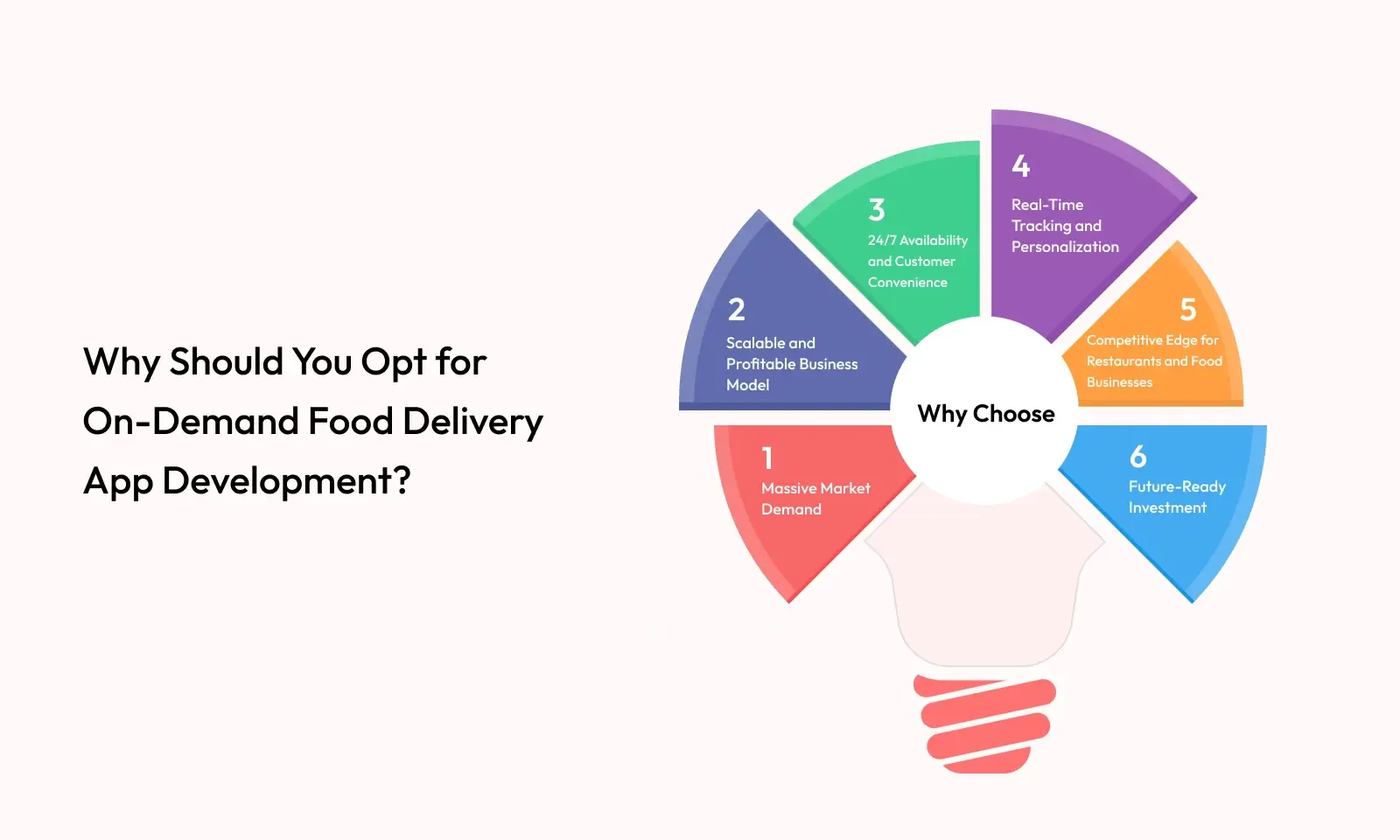
Why should you opt for on-demand food delivery app development?

- Massive market demand: The food delivery industry is booming, with millions of orders placed every day across the globe. Consumers are increasingly reliant on apps to order meals, especially in urban areas where time constraints, work schedules, and lifestyle habits leave little room for traditional dining.
- Scalable and profitable business model: On-demand food delivery apps generate revenue through various streams restaurant commissions, delivery fees, surge pricing, ads, and premium subscriptions. As your user base grows, so does your income potential. Plus, tech-driven automation helps keep operational costs in check, making the model highly scalable.
- 24/7 availability and customer convenience: Unlike traditional dining, food delivery apps operate round the clock, allowing users to place orders at any time. This kind of availability meets the demands of diverse user groups, from office-goers to night owls, and enhances customer satisfaction and retention.
- Real-time tracking and personalization: With GPS tracking, users know exactly when their order will arrive. AI and machine learning can further personalize user experiences suggesting dishes based on previous orders, offering time-based discounts, and improving overall engagement.
- Competitive edge for restaurants and food businesses: Restaurants that partner with or own delivery apps gain access to a wider audience without spending heavily on traditional marketing. A custom app also allows them to build direct relationships with customers, control branding, and optimize delivery logistics.
- Future-ready investment: The on-demand economy is expanding rapidly, and consumer habits are only moving more toward digital-first experiences. Investing in food delivery app development today positions your business to stay relevant and competitive for years to come.
If you’re looking to build a tech-enabled business that combines high demand, repeat usage, and solid monetization potential on-demand food delivery app development is a smart move.

Features of an on-demand food delivery application

⇒ User app features (Customers):

These features ensure a seamless and satisfying ordering experience for end-users.
- User registration & profile management: Allow users to sign up or log in via mobile number, email, or social accounts. After logging in, they can manage their profile, add multiple delivery addresses, save preferences, and view loyalty points or rewards. A smooth onboarding process builds early trust and improves user retention.
- Restaurant discovery & filters: Provide users with a smart search and filter system to discover nearby restaurants based on cuisine type, ratings, delivery time, pricing, or availability. A clean UI with well-organized filters ensures that users can quickly find what they’re craving.
- Menu browsing with item details: Enable users to browse a digital menu with high-quality images, detailed descriptions, ingredient lists, customization options (like spice level, size), and item availability. This mimics the dine-in experience and helps users make informed choices.
- Cart and checkout: Offer a robust cart system where users can review selected items, add special instructions, apply promo codes, and proceed to a frictionless checkout process. A clean, intuitive cart flow minimizes drop-offs and abandoned orders.
- Multiple payment options: Integrate secure payment gateways supporting credit/debit cards, UPI, net banking, digital wallets, and cash on delivery. Providing choice and security in payment builds user confidence and improves conversions.
- Real-time order tracking: Allow users to track every stage of their order from acceptance to preparation to dispatch—via live GPS tracking. This transparency reduces anxiety and improves the overall delivery experience.
- Ratings and reviews: Let users rate restaurants and delivery personnel after each order, and write reviews. This feedback loop not only helps other customers but also pushes vendors and partners to maintain service quality.
- Order history and reordering: Show past orders in a well-organized history section. With one-click reorder options, users can quickly place repeat orders without browsing menus again, increasing convenience and loyalty.
- Push notifications: Send timely notifications for order updates, promotions, discounts, and app events. Push alerts keep users engaged and informed without being intrusive.
- Customer support/chatbot: Provide accessible support through in-app chat, helpdesk tickets, or chatbot integration. Users can raise issues, check FAQs, or contact support to resolve problems swiftly, reducing churn.

⇒ Restaurant panel features:

Helps restaurants manage orders, update menus, and monitor performance in real time.
- Restaurant profile management: Restaurants can manage their branding, business hours, delivery zones, contact details, and service categories. Keeping this data accurate ensures customers have reliable info when placing orders.
- Menu management: A flexible interface to add, update, or remove dishes, categorize items, and manage item-level availability and prices. Restaurants can also highlight special dishes or mark items as “bestsellers.”
- Order management dashboard: Shows incoming orders in real-time with all necessary details. Staff can mark orders as accepted, in preparation, or ready for pickup. Timely updates help streamline kitchen operations and reduce delivery delays.
- Promotions and discounts: Give restaurants the ability to create and manage promotional offers, combo deals, or festive discounts. These promotions can be targeted to specific user groups or time slots to increase orders during low-demand periods.
- Inventory notifications: Restaurants can receive alerts when specific ingredients or menu items run low, allowing them to mark items as out-of-stock and avoid customer frustration.
- Customer ratings and feedback: Access to customer reviews allows restaurants to identify service gaps, improve menu quality, and respond to complaints or compliments directly, fostering a culture of continuous improvement.
- Sales and revenue reports: Get visual dashboards and detailed reports on earnings, order volumes, peak hours, top-selling items, and customer behaviour. These insights enable data-driven decision-making and optimize business strategies.

⇒ Delivery partner app features:

Empowers delivery agents to manage orders efficiently while staying informed and secure.
- Delivery agent registration and verification: Agents can register via the app and upload documents (ID, address proof, driving license) for background verification. Admin approval ensures a secure network of trusted delivery personnel.
- Order notifications and acceptance: Delivery agents receive order requests based on proximity and availability. They can review order details and either accept or decline deliveries, helping maintain efficient logistics.
- Real-time navigation: Integrated maps and GPS guide delivery agents from the restaurant to the customer’s location using optimized routes, helping reduce delivery time and fuel costs.
- Order details and status updates: Agents can view customer names, contact info, order contents, and special instructions. They can also update order status in real time (e.g., picked up, en route, delivered), keeping all parties informed.
- Earnings dashboard: A dedicated section where agents can track their completed deliveries, daily/weekly earnings, performance bonuses, and tips received offering full transparency into their income.
- Availability toggle: Agents can go “online” or “offline” based on their availability. This ensures that only active agents receive orders, improving delivery efficiency and agent satisfaction.
- Delivery support: Provide in-app access to support if agents face issues such as navigation errors, unresponsive customers, or order discrepancies. Emergency contact options also add a layer of safety.

⇒ Admin panel features:

The admin portal acts as the backbone of the entire ecosystem, offering full control and operational oversight.
- Dashboard overview: Displays live statistics like active users, total orders, revenue, app performance, and geographic activity. A powerful dashboard helps admins keep a pulse on operations and growth.
- User management: Admins can add, edit, or suspend customer and delivery partner accounts. They can also monitor user activity, flag suspicious behaviour, or handle user escalations.
- Restaurant and delivery partner onboarding: Streamline onboarding with an approval system for new restaurants and agents. Admins can review submitted documents, approve profiles, and assign geographic zones or delivery areas.
- Order monitoring: Track every order’s lifecycle from placement to fulfillment. Admins can step in to reassign delivery agents, escalate issues, or offer refunds in case of failed orders.
- Commission and pricing control: Set and manage commission rates for restaurants, define platform fees, configure dynamic delivery charges, and implement surge pricing based on demand, location, or time of day.
- Content management system (CMS): Manage static content like app banners, terms of service, FAQs, promotional graphics, and home screen carousels keeping content fresh and relevant without developer dependency.
- Reports and analytics: Generate downloadable reports and visual dashboards covering financials, customer trends, churn rates, delivery times, and feedback analytics helping shape strategic decisions.
- Push notification management: Send out broadcast notifications or segment-specific messages to customers, partners, or vendors for promotions, policy updates, or emergencies.
- Dispute resolution tools: Track complaints related to orders, payments, or service. Provide admin-level tools to issue refunds, compensate users, deactivate faulty vendors, or mediate issues between stakeholders.

Steps to develop a food delivery app for your business idea

how to develop a food delivery application

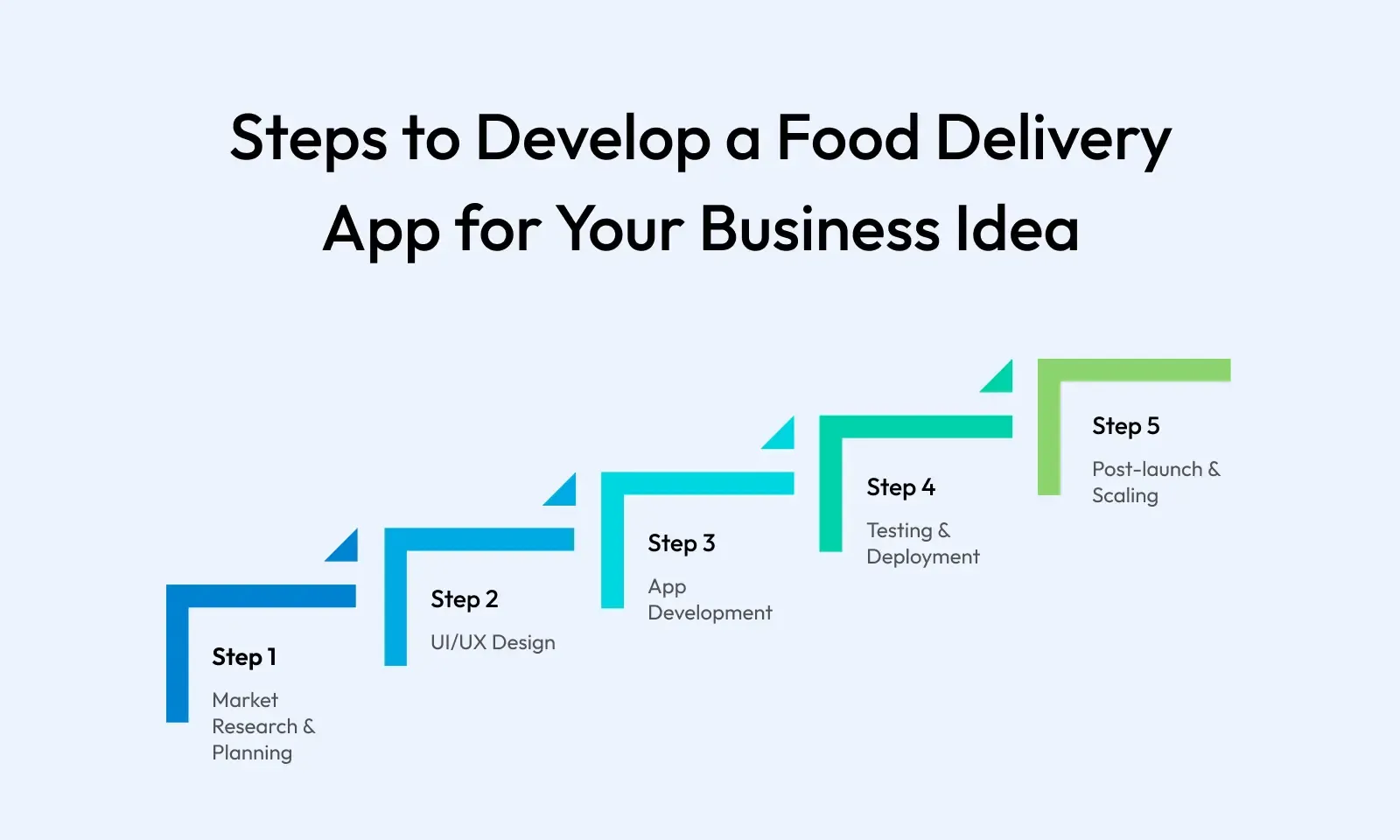
⇒ Market research and planning: Understanding business models, customer expectations, and competitors. Before writing a single line of code, a strong foundation must be built. This starts with deep market research and thoughtful planning. Some of the key considerations include:

  • Define who your customers are students, working professionals, families, health-conscious eaters, etc. Understand their dining habits, tech preferences, and pain points.
  • Choose a model that aligns with your vision. Common models includes order-delivery, aggregator, and cloud kitchen models.
  • Study your competitors (e.g., Swiggy, Uber Eats, DoorDash) to analyze their features, pricing, marketing strategies, strengths, and gaps.
  • Decide how the app will make money commissions, ads, subscriptions, delivery charges, or a mix of all.

By the end of this stage, you should have a business plan, feature roadmap, monetization model, and a clear understanding of the competitive landscape.

⇒ UI/UX design: Creating an intuitive and appealing interface for users, restaurants, and delivery agents. Design is more than aesthetics it's about guiding users seamlessly from opening the app to completing an order.

  • Define and optimize how users search for food, place orders, track deliveries, and give feedback.
  • Sketch low- and high-fidelity wireframes for all user types (customer, admin, delivery, restaurant).
  • Make it easy to browse menus, apply filters, and complete purchases with minimal friction.
  • Ensure design caters to all users, including those with disabilities, and supports different screen sizes.
  • Use brand colours, clean typography, and icons consistently across all screens.
  • Add subtle animations or cues to make the experience feel smooth and responsive.
  • Inform users about the success or failure of their actions e.g., adding to cart, payment success, etc.

This stage ends with a clickable prototype and UI design handover to developers, ready for implementation.

⇒ App development: Choosing the right technology stack and building each module of the app. Now comes the core development phase, where design meets code. The architecture must be scalable, secure, and modular.

  • Choose between native (Swift for iOS, Kotlin for Android) or cross-platform (Flutter, React Native) based on your timeline and budget.
  • A responsive dashboard for admin and restaurants (usually built using React.js or Angular).
  • Use robust frameworks like Node.js, Django (Python), or Laravel (PHP) to handle business logic and APIs.
  • Choose scalable databases like PostgreSQL, MongoDB, or Firebase Realtime DB to store user, order, and transaction data.

Some of the key features to develop:

  • User authentication & role management
  • Restaurant listing & filtering
  • Cart and order processing
  • Payment gateway integration
  • Delivery tracking with GPS
  • Push notifications
  • Admin & analytics dashboards

⇒ Integrations:

  • Maps API for live location and route optimization (Google Maps, Mapbox)
  • Payment gateway integration such as Razorpay, Stripe, PayPal, etc.
  • SMS and Email services like Twilio, SendGrid for OTPs and notifications.

Development is typically done in agile sprints, with features broken down into smaller milestones.

⇒ Testing and deployment: Ensuring reliability, performance, and smooth user experience across all platforms. No matter how well you build the app, a poor release can ruin its first impression. Testing ensures the app works flawlessly in real-world conditions. Some of the testing types are functional, UI/UX, performance, security, and device/browser testing. The deployment process:

  • Prepare builds for the App Store and Google Play following their submission guidelines.
  • Use CI/CD pipelines for faster and safer release cycles.
  • Launch a beta version or pilot test in a small city or region to gather early feedback.

A successful launch is followed by real-time monitoring, bug fixes, and small enhancements based on user behaviour and feedback.

⇒ Post-launch & scaling: Customer acquisition strategies and scaling the platform for long-term growth. Launching the app is just the beginning. Sustained growth depends on smart marketing and continual optimization.

  • Build anticipation through social media teasers, landing pages, and influencer partnerships.
  • Collaborate with select restaurants for early onboarding and offers.
  • Expand to new cities or regions after refining operations in your initial market.
  • Add new verticals like groceries, beverages, or desserts to increase average order value.
  • Use analytics to understand customer preferences and deliver personalized recommendations using AI/ML.
  • Regular updates, customer support, feedback loops, and tech improvements will help you build a long-lasting food delivery brand.

What innovative solutions are food delivery apps implementing?

Food delivery apps are constantly evolving to enhance user experience, streamline operations, and stay ahead of the competition. Here are some innovative solutions being implemented:

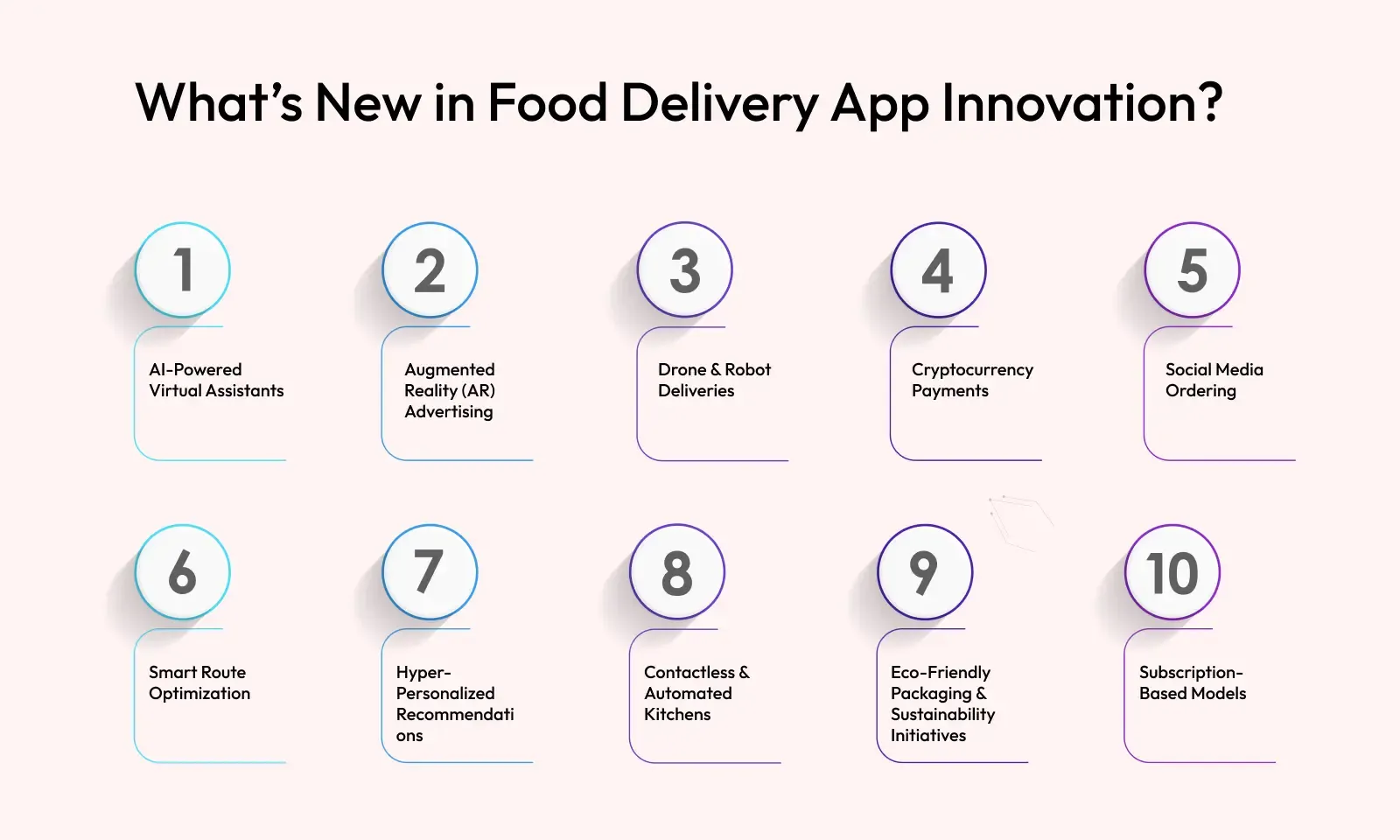
What's new in food delivery app innovation

- AI-powered virtual assistants: Apps are integrating AI-driven voice assistants like Siri and Google Assistant to allow users to place orders using voice commands.
- Augmented reality (AR) advertising: Some platforms use AR to showcase menu items in a more interactive way, helping customers visualize dishes before ordering.
- Drone & robot deliveries: Companies are experimenting with autonomous delivery systems, including drones and robots, to reduce delivery time and costs.
- Social media ordering: Some apps enable users to place food orders directly through platforms like Twitter, making the process more seamless.
- Smart route optimization: AI-driven algorithms help delivery partners find the fastest and most efficient routes, reducing delays and improving customer satisfaction.
- Hyper-personalized recommendations: Machine learning analyzes user preferences and order history to suggest tailored meal options.
- Contactless & automated kitchens: Cloud kitchens and robotic cooking stations are being integrated to speed up food preparation and maintain hygiene standards.
- Eco-friendly packaging & sustainability initiatives: Many apps are adopting biodegradable packaging and promoting carbon-neutral delivery options.
- Subscription-based models: Apps offer premium memberships with benefits like free delivery, exclusive discounts, and priority service.

These innovations are shaping the future of food delivery, making it more efficient, engaging, and sustainable.

Conclusion

Food delivery apps have evolved from a luxury to a lifestyle essential, especially in urban areas. With the rise in demand, digital-first consumers, and evolving culinary habits, there's a massive opportunity for businesses to launch their own food delivery platforms. However, the journey requires more than just an app it needs the right mix of market research, tech infrastructure, customer-centric design, strong vendor partnerships, and a scalable marketing strategy. Whether you're targeting a hyperlocal market or planning to take on the big names, getting started with the right tech partner is key. If executed well, your app can be more than a delivery platform it can become a trusted part of your users' everyday lives.

Frequently asked questions

1. What features are absolutely essential in a food delivery app MVP?
An MVP (Minimum Viable Product) should include:

  • User registration & login
  • Restaurant search & filters
  • Menu browsing & cart
  • Order placement
  • Payment gateway integration
  • Order tracking
  • Basic admin panel

This gives you enough to launch, gather feedback, and build enhancements based on real usage patterns.

2. How can I ensure real-time order tracking in my app?
Integrate Google Maps API or Mapbox for GPS tracking, combined with WebSocket or Firebase for live order updates. Delivery agents’ location is continuously shared with the user in real time, and order statuses are updated dynamically from the partner or admin panel.

3. What backend technology is best for a scalable food delivery app?
Node.js (for real-time event handling), Python/Django (for rapid development), and PHP (Laravel) are common choices. Use cloud platforms like AWS, GCP, or Azure, and MongoDB or PostgreSQL for databases. A microservices-based architecture is advisable if you plan to scale or launch in multiple cities.

4. How do I handle peak-time server loads and traffic spikes?
You can:

  • Use auto-scaling cloud infrastructure (e.g., AWS EC2, Kubernetes)
  • Set up caching layers using Redis or Cloudflare
  • Use load balancers and CDNs
  • Optimize APIs and database queries
  • Proactive performance testing and infrastructure planning are essential to avoid downtime.

5. Is it possible to monetize the app beyond delivery commissions?
Absolutely. Common monetization methods include:

  • Featured listings & ads for restaurants
  • Subscription models for users (e.g., Zomato Gold)
  • Surge pricing during peak hours
  • In-app ad spaces or banner placements
  • Affiliate partnerships for beverages or grocery add-ons

A mix of revenue streams helps you build a sustainable business.

Evoqins - Blog

Subscribe and keep updated

Get weekly update about our product on your email, no spam guaranteed we promise ✌️